OMG! Ubuntu!
Follow
An easier way to enter characters with accent marks on Ubuntu
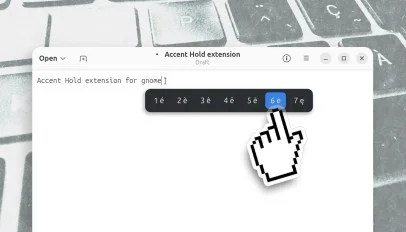
Typing accented characters on Ubuntu isn’t as easy as it is on macOS (or modern smartphone keyboards), where you just have to a key to see available characters appear in a pop-over, and then pick one. Accent Hold is a GNOME Shell extension that adds macOS-style press-and-hold behaviour. Just press and hold a letter key (e, c, etc) and accented variants and other diacritics (é è ê ë, ç ć č, etc) appear in a small pop-up, beside the text cursor. Press the matching number to pick a character, or use your keyboard arrow keys or mouse. The default way […]