Microsoft Power BI Blog
Follow
Deep dive into composite semantic models with Direct Lake and import tables
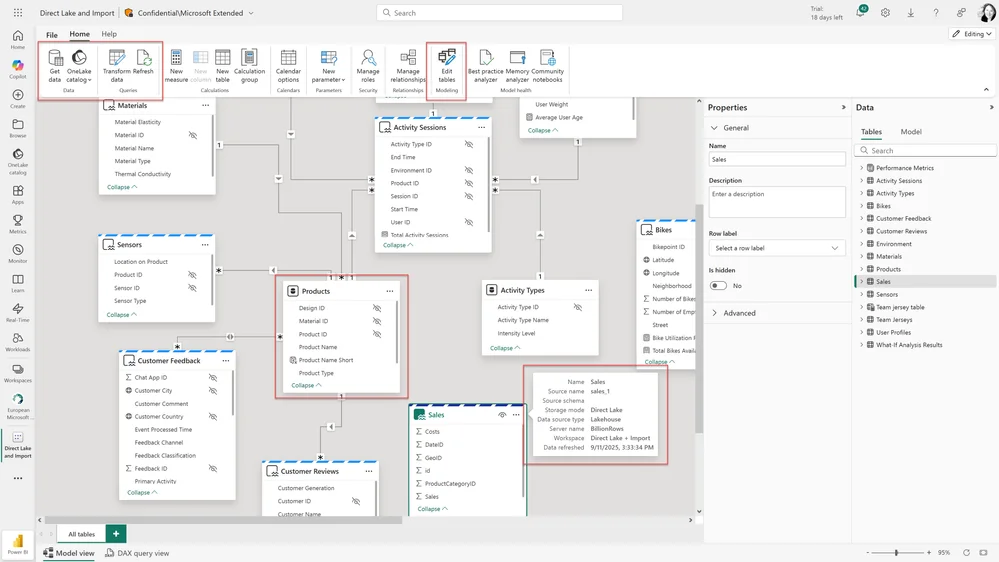
Power BI now supports composite semantic models combining Direct Lake and import tables, offering increased flexibility. This allows users to integrate data from various sources, including OneLake, SQL databases, and Excel files via Power Query. Direct Lake tables can now be combined with import tables, even from the same data source. This update introduces new buttons within the Power BI web modeling interface for easily adding tables. Users can create these composite models through the Fabric portal, workspace pages, or the Lakehouse and Power BI Desktop. The refresh feature updates import table data and synchronizes Direct Lake table schemas. Users can then perform tasks like renaming, adding relationships and measures. The document provides a detailed example of creating a model. It demonstrates how to create SQL based Deliveries and Calendar tables and a CSV with targets. Finally, this guide shows how to connect to the various tables and create relationships. Users can seamlessly continue semantic modeling in the web or switch to Power BI Desktop for live editing.