Microsoft Power BI Blog
Follow
Modern Visual Tooltips in Power BI (Generally Available)
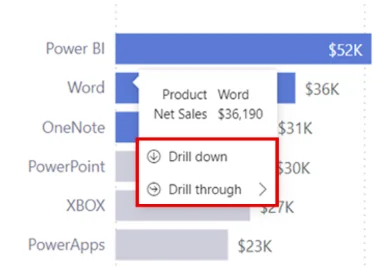
Power BI has updated its visual tooltips, enhancing report interaction across all platforms. These new tooltips feature a built-in actions footer, allowing users to drill down and through data directly. This streamlines workflows and makes data exploration more intuitive within the Power BI environment. Report authors can enable or disable the actions footer for each visual through the format pane. The updated tooltips automatically adopt the report's theme colors, ensuring visual consistency. Users can customize colors, fonts, and transparency to match branding needs. Theme customization updates all tooltips, while individual visual modifications only affect that specific visual. Existing reports retain their original tooltip style until the author updates them. New reports will default to using the modern tooltip experience. These updated tooltips provide faster insight discovery for report consumers. Custom styling and the actions footer improves report creation and data analysis. The documentation provides further details on creating and customizing these new tooltips.