Microsoft Power BI Blog
Follow
Power BI Desktop Bridge (Preview)
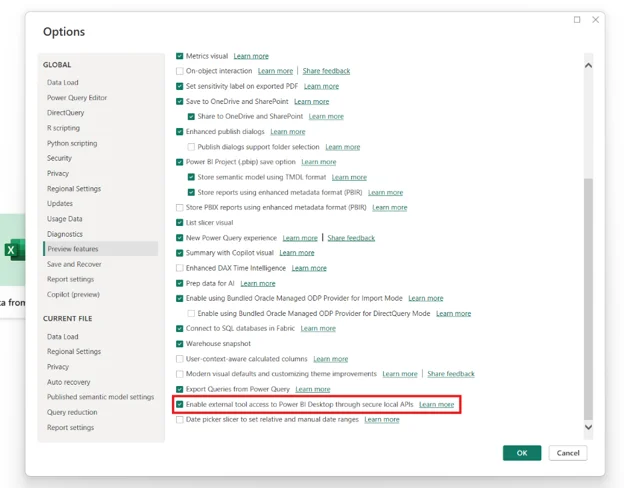
Power BI Desktop Bridge offers a new way for external applications to interact directly with Power BI Desktop. It functions as a lightweight local server, creating a secure channel for tools and scripts. This allows agents to check the report's current state and detect unsaved changes. They can also trigger key actions, such as reloading files after edits are made. Furthermore, the bridge enables the capture of screenshots to validate visual changes in real-time. Previously, intelligent agents had limitations in interacting with Power BI Desktop directly. Now, they can read report states, edit files on disk, and instantly see changes after reloading. This allows for immediate iteration and improvement without manual handoffs. The Report Authoring Skill is a prime example, demonstrating how the bridge automates report creation and refinement. The Desktop Bridge is enabled by default in Power BI Desktop and can be managed in preview features. The Power BI Desktop Bridge CLI provides a simple way to start using its capabilities. Commands like manifest, status, reload, and screenshot-all offer practical ways to leverage the bridge. This technology is poised to revolutionize how users work with Power BI Desktop by enabling automation.