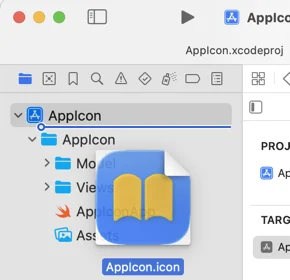
Adding Icon Composer icons to Xcode
Icon Composer is a new tool in Xcode 26 that helps build icons for the Liquid Glass design system. To use Icon Composer, design your icon's foreground layers in a preferred design tool, export them as fully opaque SVG layers, and import them into Icon Composer. In Icon Composer, add the background, adjust layer sizes and positions, set opacity, color, gradients, shadows, and glass effects. Xcode uses the single .icon file to generate all icon variants for supported platforms. To add icons to an Xcode project, drag the .icon file into the project navigator sidebar. Once added, you can open and edit the icon file in Icon Composer directly from Xcode. Make sure the App Icon Set Name in the target settings matches the Icon Composer icon file name without the .icon extension. Unfortunately, Icon Composer does not support alternate app icons, and you need to export and manually add image files to the asset catalog. This reduces the usefulness of Icon Composer for alternate app icons. Apple provides resources, including the Human Interface Guidelines and WWDC videos, to learn more about Icon Composer and app icon design.