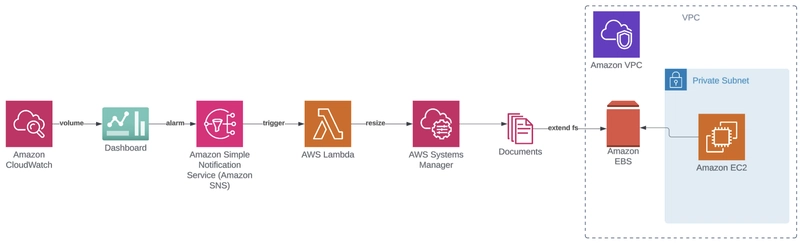
This article details how to automate Amazon Elastic Block Store (EBS) volume upsizing for EC2 instances, specifically addressing a common issue with SAP workloads running out of disk space. The solution involves creating a hands-free setup that detects low disk space, triggers an automated workflow, and expands volumes without downtime. First, it outlines the necessary prerequisites, including an AWS account and the AWS CLI. The walkthrough begins with configuring the EC2 instance to enable Systems Manager, which is crucial for remote management, and setting up VPC endpoints if the instance lacks public access.
Next, it guides through installing and configuring the Amazon CloudWatch agent on an EC2 instance, focusing on collecting disk usage metrics. This includes downloading the agent, running the configuration wizard, and ensuring the agent is running and enabled. The article then demonstrates how to create a CloudWatch dashboard to visualize disk usage with a gauge widget, specifying the necessary metrics and dimensions.
A key component is the creation of a custom AWS Systems Manager runbook. This runbook is designed to automate the process of extending the filesystem after an EBS volume has been resized. It includes parameters for device, mount path, and execution timeout, and executes a shell script to install required tools, grow the partition, and resize the filesystem based on its type (ext4 or XFS). The provided script handles LVM filesystem expansion, resizing physical volumes, extending logical volumes, and growing XFS filesystems, ensuring that newly added storage space is usable by the operating system. This comprehensive setup allows for seamless, automated disk space management, preventing application disruptions due to storage limitations.

dev.to
dev.to

RSS Hunter
2025-09-29