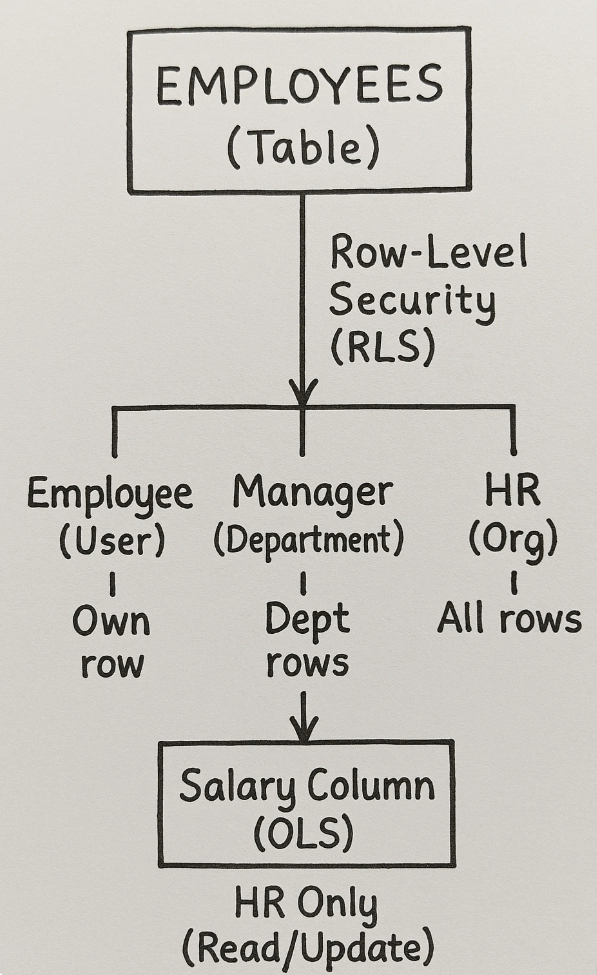
Dataverse apps require careful control over data access for users. Two crucial governance practices are Row Level Security (RLS) and Object Level Security (OLS). RLS determines which specific records a user can see, like an employee seeing only their own data. OLS, conversely, controls visibility of entire tables and their fields, such as hiding a 'Salary' column from most users. Combining these ensures users only access relevant and protected information. RLS is managed through Security Roles and Hierarchical Security, while OLS uses Table Permissions and Field-Level Security Profiles. For an HR app scenario, regular employees can be restricted to their own records using the 'User' read permission in their security role. Managers can see employees within their business unit by setting the 'Business Unit' read permission for their role. HR staff require 'Organization' level read permission for full access to all employee records. To hide sensitive fields like 'Salary', Field Security Profiles are employed. Enabling field security for the 'Salary' column and assigning users to a specific profile ensures only designated personnel can view or edit it. Best practices include planning roles upfront, using security groups, thorough testing, adhering to the principle of least privilege, and documenting all security configurations. This comprehensive approach safeguards sensitive data and enhances application governance.

dev.to
dev.to

RSS Hunter
2025-09-10