Google Cloud Blog
Follow
Developer’s guide to implementing MCP apps in Gemini
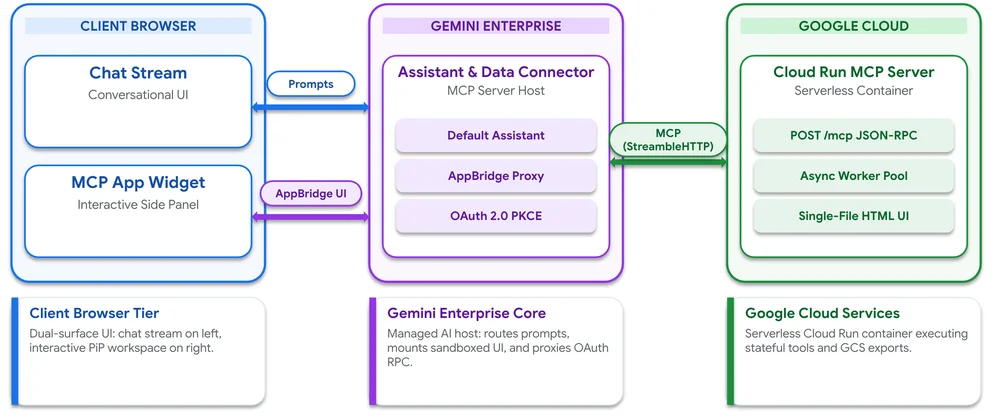
Enterprise assistants primarily use text, which is inefficient for visual, multi-step tasks requiring frequent adjustments. MCP Apps, an extension of the Model Context Protocol, solves this by pairing tools with live user interfaces rendered directly within the Gemini Enterprise chat flow. These interactive UIs, embedded in sandboxed iframes, can expand to full screen or a side panel. Edits are processed locally, maintaining synchronization between the workspace and the assistant. This approach eliminates the need to rebuild core infrastructure, leveraging Gemini Enterprise for authentication, data access, and the default assistant. Users host their MCP server on a private Cloud Run service. Throughout generations, enterprise assistants evolved from static text chatbots to those invoking live APIs, and now to interactive MCP Apps with live workspaces. MCP Apps offer a responsive user experience, purpose-built workflows, enterprise-grade security, human-in-the-loop governance, and broad connectivity. The architecture involves three decoupled tiers: the client browser, Gemini Enterprise, and the user's Google Cloud project. Security is enforced through two layers of authentication: Cloud Run IAM and in-app OAuth. Building an MCP App involves creating a server and HTML widget, deploying to Cloud Run, and registering it within Gemini Enterprise. Once registered, MCP tools are imported as actions that can be enabled and connected to Gemini Enterprise apps for seamless integration.