Planet Python
Follow
Graham Dumpleton: Introducing jupyterlab-workshop
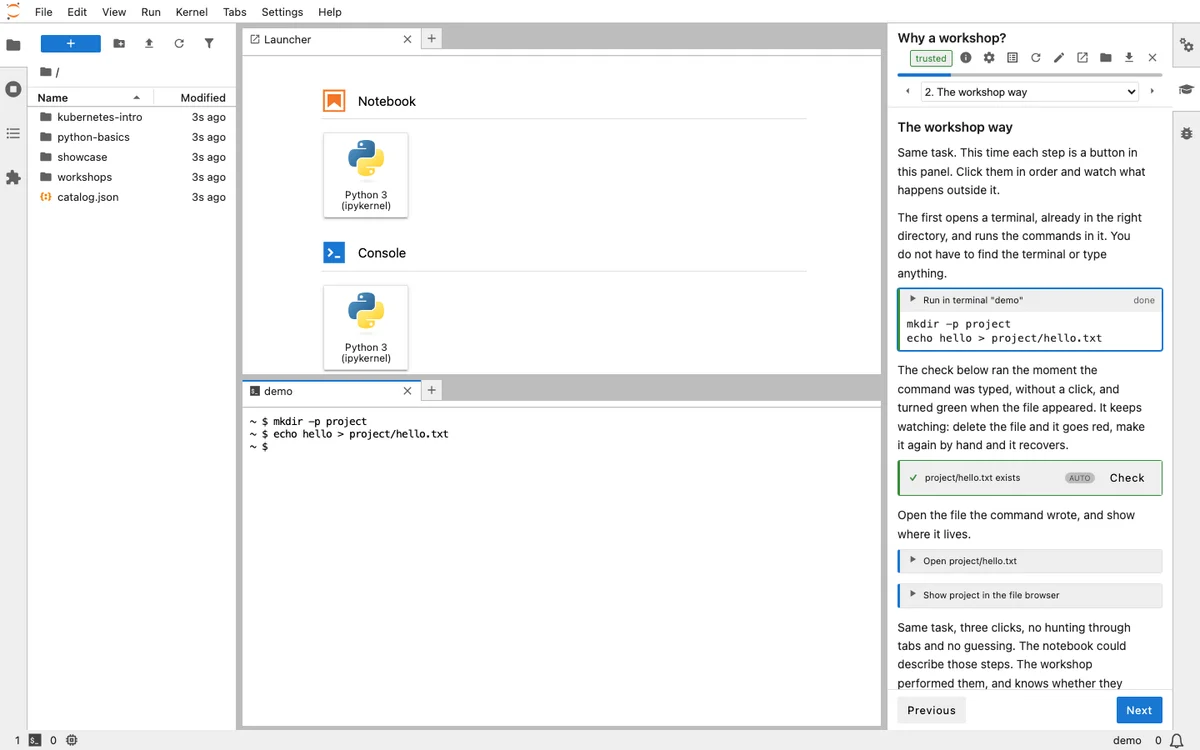
The author developed jupyterlab-workshop, a JupyterLab extension, to address limitations in using plain Jupyter notebooks for educational workshops. This extension separates instructions from the actual work to be done by the learner. Instructions are presented in a sidebar panel, with each step being an actionable item within the JupyterLab environment. These actions can include running terminal commands, modifying files, creating notebooks, and executing code. The workshop can also verify learner progress and enforce task completion before allowing them to proceed.Unlike notebooks where learners might passively watch code execute, this extension ensures active participation as actions are performed in real-time. It overcomes the constraint of notebooks being limited to a single language by enabling interaction with the broader JupyterLab environment and external tools. This separation prevents the conflation of instructional content and completed work, offering a clearer learning path. The sidebar panel provides navigation, progress tracking, and details of performed actions.Each executable step is not simulated; clicking an action executes it in a live terminal or performs the designated task. The extension supports various actions, including terminal operations, file management, notebook interaction, and interface manipulation. Workshops can even be designed to arrange the user interface for optimal learning at specific points. Checkpoints allow learners to save their progress and revert to a known state if errors occur.The extension includes a robust verification system, allowing for checks through Python code, shell commands, or file-based predicates. Quizzes can also be integrated, with answers feeding into subsequent steps. The manifest file dictates whether task completion is advisory or mandatory. Security is addressed through a trust mechanism where learners grant specific capabilities to workshops before execution.A workshop itself is structured as a directory containing a manifest file, Markdown files for pages, and any necessary starter files. This plain-text structure facilitates version control. Pages are written in MyST Markdown, with actions defined in fenced code blocks. The extension can be installed locally or used via services like mybinder.org and GitHub Codespaces, allowing workshops to run in various environments without complex setup. The author chose not to use their previous platform, Educates, because it required Kubernetes, limiting its accessibility for smaller teams and individuals.