Graham Dumpleton: Writing a workshop for JupyterLab
This text describes the creation of a JupyterLab workshop focused on teaching pytest.
The workshop is designed to be small enough to fit within a blog post but contains all essential elements of a real workshop.
It includes a manifest, multiple pages, interactive actions, automatic checks, a quiz, and supporting tools.
The workshop teaches the fundamental pytest loop: writing a test, observing its failure, and then fixing the code.
This iterative process is structured across four distinct pages within the workshop.
A key feature is the creation of an isolated Python environment for the workshop, ensuring pytest is installed without affecting the learner's system.
This approach leverages content lessons from a previous conference talk to enhance the learning experience.
The process begins with planning and defining verifiable steps, distinguishing workshops from tutorials.
The workshop is generated using the jupyter workshop init command, which sets up the directory structure and a manifest file.
Capabilities like terminal access, file writing, code execution, and package installation are declared in the manifest, and are verified by linters.
The environment field in the manifest specifies dependencies, such as pytest, which are installed into a self-contained virtual environment.
This avoids manual environment setup, allowing learners to focus on pytest itself.
The env entry in the manifest also disables Python bytecode caching to prevent issues with rapid file modifications.
The workshop utilizes a files/orders.py file containing a deliberately buggy function for learners to debug.
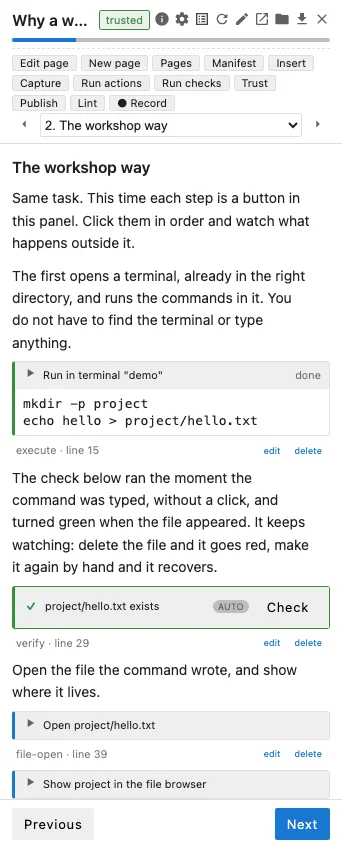
Each page in the workshop uses Markdown and specific action blocks to guide the learner through tasks like opening files, writing code, and running commands.
Checks are implemented using the verify action, which automatically validates the outcome of learner actions, ensuring progress and learning.
A quiz action is included to prompt learners to predict outcomes before running tests, reinforcing understanding of how pytest behaves.
The editor-insert action allows new code, like tests, to be added and viewed directly in the editor.
The workshop's structure and content are designed to be interactive and educational, focusing on practical application of pytest.

jupyter workshop initcommand, which sets up the directory structure and a manifest file. Capabilities like terminal access, file writing, code execution, and package installation are declared in the manifest, and are verified by linters. The environment field in the manifest specifies dependencies, such as pytest, which are installed into a self-contained virtual environment. This avoids manual environment setup, allowing learners to focus on pytest itself. Theenventry in the manifest also disables Python bytecode caching to prevent issues with rapid file modifications. The workshop utilizes afiles/orders.pyfile containing a deliberately buggy function for learners to debug. Each page in the workshop uses Markdown and specific action blocks to guide the learner through tasks like opening files, writing code, and running commands. Checks are implemented using theverifyaction, which automatically validates the outcome of learner actions, ensuring progress and learning. Aquizaction is included to prompt learners to predict outcomes before running tests, reinforcing understanding of how pytest behaves. Theeditor-insertaction allows new code, like tests, to be added and viewed directly in the editor. The workshop's structure and content are designed to be interactive and educational, focusing on practical application of pytest.