Google Cloud Blog
Follow
How to Analyze and Govern Gemini Enterprise App Usage at Scale with BigQuery
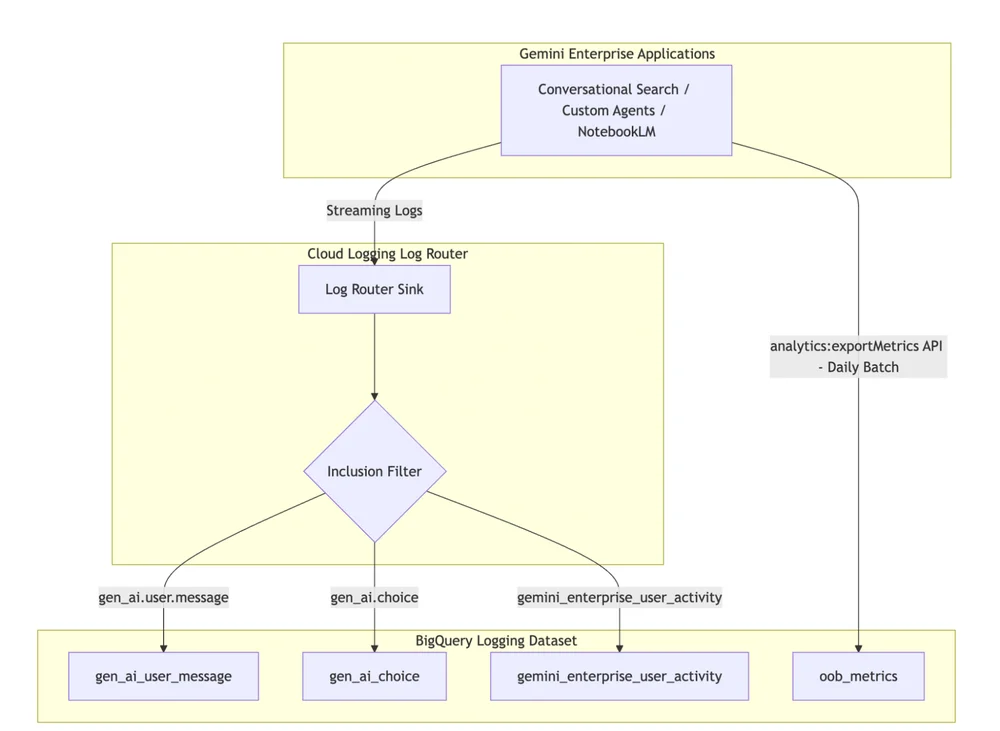
Deploying Gemini Enterprise offers significant productivity gains with its AI tools, but managing large-scale adoption presents administrative challenges. Google Cloud provides out-of-the-box dashboards for basic adoption metrics. However, for a deeper understanding of agentic AI's impact, organizations need a more granular, context-specific perspective. This is where Google BigQuery becomes essential for in-depth analysis and governance of AI adoption.Combining Gemini Enterprise with BigQuery enables lean administrative teams to analyze and govern deployments effectively. It allows for detailed profiling of user behaviors, quantification of organizational value by linking logs with business data, and precise compliance audits to prevent data leaks. Furthermore, it facilitates instant investigation of safety alerts by pinpointing the exact trigger for security blocks.The telemetry is structured into five distinct BigQuery tables, capturing diverse data like user prompts, model responses, user activity, administrative actions, and data access. An automated ingestion pipeline, utilizing Cloud Logging Log Router Sinks and an asynchronous batch export API, streamlines data flow to BigQuery. This pipeline captures both detailed conversational logs and aggregate metrics without complex custom development.Administrators can leverage BigQuery's AI-powered tools, such as Conversational Analytics, to simplify complex queries and gain immediate insights. These tools automatically generate SQL, provide schema documentation, and surface relevant metadata, making telemetry analysis more intuitive. BigQuery's capabilities also extend to running advanced machine learning tasks like sentiment analysis or forecasting.By connecting Data Studio to BigQuery, raw log data can be transformed into interactive dashboards for executive stakeholders. These dashboards can track user adoption, ROI, data grounding traffic, and content safety. Sharing BigQuery Conversational Analytics agents via Data Studio further empowers business users to explore data directly. Implementing this setup involves enabling logging, configuring log sinks, and leveraging BigQuery's analytical and visualization tools.