Google Cloud Blog
Follow
How to Use Python UDF Logging for Pipeline Observability
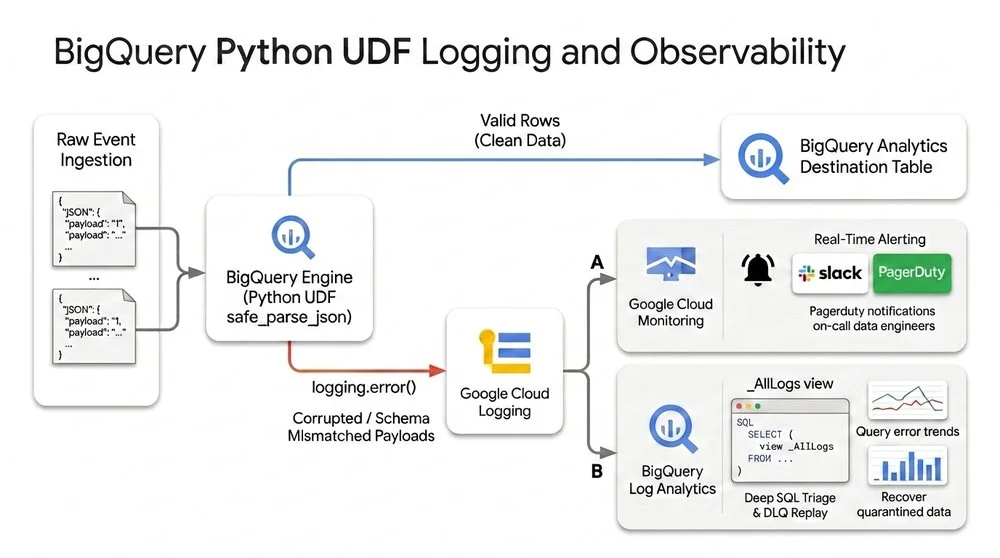
BigQuery now supports Python UDF logging, allowing developers to emit structured logs directly into Cloud Logging using Python's standard logging library. This new feature facilitates operational monitoring and debugging without external plugins, particularly useful for building fault-tolerant data pipelines. The workflow involves inline validation within the Python UDF, real-time alerting via Cloud Monitoring on log-based metrics, and SQL triage/replay of quarantined data.A practical example demonstrates an e-commerce event ingestion pipeline. The generic Python UDF parses JSON, logs diagnostic information for invalid records, and returns NULL to prevent query failure. Logging is enabled via SET @@udf.properties in the BigQuery session.Real-time alerts can be configured in Cloud Logging using a specific log filter for UDF errors. For forensic analysis, BigQuery Log Analytics over the linked _AllLogs view allows data engineers to query quarantined payloads directly with SQL. Because raw payloads are preserved, problematic records can be recovered and re-ingested into the production table, ensuring no data loss.Beyond data validation, this logging feature supports use cases like shadow execution for safe migrations, PII redaction auditing, and detecting ML inference drift. Best practices include enabling debug output, avoiding sensitive data in logs, and managing logging costs by selective logging. This integration streamlines debugging and enhances data pipeline resilience within BigQuery.