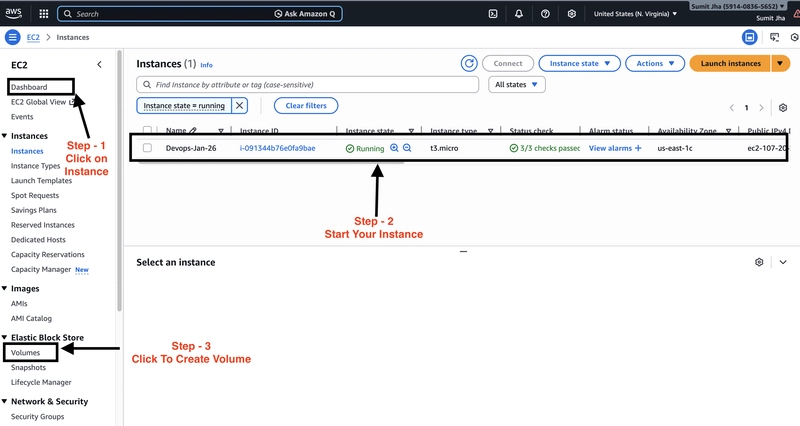
The author encountered difficulty creating and mounting an EBS volume on AWS due to a common mistake. The first step involves checking the availability zone, which is crucial for successful volume creation. The EC2 instance needs to be running before creating a volume. The process involves navigating the EC2 dashboard and accessing the "Volumes" section. The user then selects the size of the disk and the availability zone. The author highlights their mistake of selecting the incorrect availability zone during volume creation. This leads to the instance not appearing as an option for attaching the volume. To resolve this, the author emphasizes the importance of verifying the correct availability zone in the instance's "Networking" details. Creating a volume without the correct availability zone will prevent the volume from working. Recreating the EBS volume with the correct Availability Zone is essential for successful mounting. The article concludes by stressing the importance of this detail for project implementation.

dev.to
dev.to

RSS Hunter
2026-02-08
Create attached notes ...