DEV Community
Follow
Mitsuki API Observability with Grafana and Prometheus
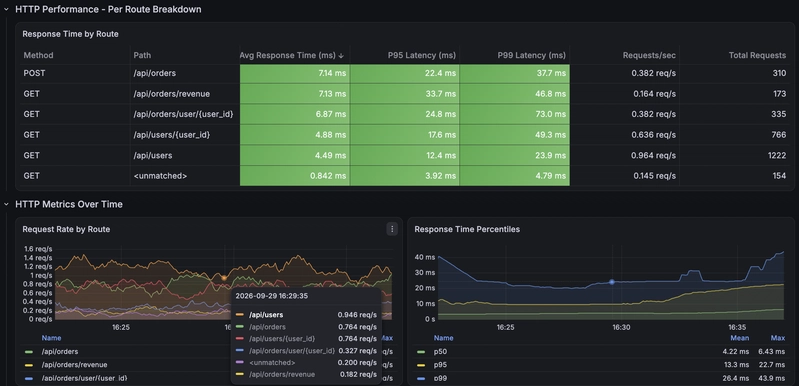
This tutorial outlines how to run a Mitsuki application with Prometheus and Grafana for comprehensive metric monitoring. Mitsuki, a lightweight web framework, automatically instruments applications, providing detailed request, component, scheduler, and system metrics. The setup uses Docker Compose to orchestrate the Mitsuki application, Prometheus for scraping metrics, and Grafana for visualization. A key feature is the framework's pre-built Grafana dashboard, which is automatically provisioned; users gain extensive insights without writing any queries.The docker-compose.yml defines services for Mitsuki, Prometheus, and Grafana, with a dashboard-init service to generate the Mitsuki dashboard. Prometheus is configured to scrape the Mitsuki application's /metrics/prometheus endpoint every five seconds. Traffic generation through curl commands populates data for various metrics, including HTTP requests and 404 errors.The Mitsuki Application Metrics dashboard provides panels for overview statistics, HTTP performance per route, component performance per method, and scheduler task metrics. This dashboard covers all metrics emitted by Mitsuki itself, making it universally applicable to any Mitsuki application. Queries for panels like Request Rate by Route, P95 Latency, and Error Rate demonstrate how the metrics are aggregated.The tutorial specifically highlights monitoring scheduled tasks, using an OrderReconciliationService example. It explains how to simulate task failures by creating invalid orders, demonstrating how the scheduler metrics track executions, failures, and durations. An alert on the Task Failure Rate panel can notify users of failing scheduled tasks.Additionally, the demo includes a custom metrics dashboard for application-specific metrics like "Orders Created per Minute" and "Database Write Operations."
To use the framework dashboard in a personal application, users can generate the dashboard file using "mitsuki grafana-dashboard" and configure Grafana to provision it. The tutorial concludes with instructions for cleaning up the Docker environment and encourages users to explore custom business metrics.