Syncing TipKit with CloudKit
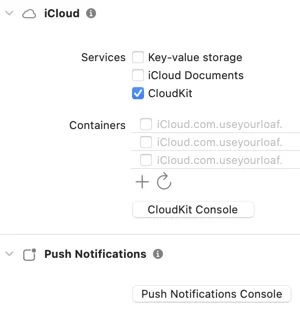
Apple introduced TipKit in iOS 17 to show in-context tips to users, and it keeps track of tip frequency and control events. In iOS 18, you can sync the TipKit state using CloudKit to avoid showing the same tips on each device. To enable CloudKit sync, select your App target in Xcode, add the iCloud capability, and select CloudKit. Then, add a container identifier ending with ".tips" and enable the Background Modes capability with Remote notifications. TipKit does not sync to CloudKit by default, so you must enable the CloudKit container when configuring the Tips datastore. You can use the .automatic option or pass a specific identifier to configure the CloudKit container. Be careful when syncing a Core Data/SwiftData database with CloudKit, as it may use the wrong container identifier. Apple recommends using a separate container for syncing tips, and you can list your Core Data/SwiftData identifier first in the entitlements file or set it explicitly before loading the persistent store. Syncing TipKit with CloudKit was introduced in WWDC24. Additionally, a book on Modern Auto Layout is available at a discounted price during the WWDC25 sale.