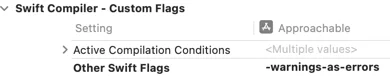
Swift 6.2 introduces finer-grained control over compiler warnings within Swift Packages. Previously, Xcode allowed treating all warnings as errors or suppressing all warnings via custom flags. However, Swift 6.1 introduced options to treat specific diagnostic groups as warnings or errors, such as "-Werror DeprecatedDeclaration". Crucially, these granular controls were not supported in Swift Packages until Swift 6.2.To utilize these new features, developers must update their Swift tools version to 6.2 in the Package.swift file. Swift 6.2 offers new swiftSettings like treatAllWarnings(as:) and treatWarning("group", as:). These settings allow precise configuration, for example, treating all warnings as errors except for a specific group like "DeprecatedDeclaration". It's important to note that these warning control settings only apply when a package is built directly and are ignored when used as a remote dependency. Developers can apply these controls to all targets within a package by iterating through the targets and appending the desired settings to their swiftSettings. This enhancement provides greater flexibility in managing build-time warnings and errors.

swiftSettingsliketreatAllWarnings(as:)andtreatWarning("group", as:). These settings allow precise configuration, for example, treating all warnings as errors except for a specific group like "DeprecatedDeclaration". It's important to note that these warning control settings only apply when a package is built directly and are ignored when used as a remote dependency. Developers can apply these controls to all targets within a package by iterating through the targets and appending the desired settings to theirswiftSettings. This enhancement provides greater flexibility in managing build-time warnings and errors.