Trey Hunner: Customizing your Python REPL's color scheme (Python 3.14+)
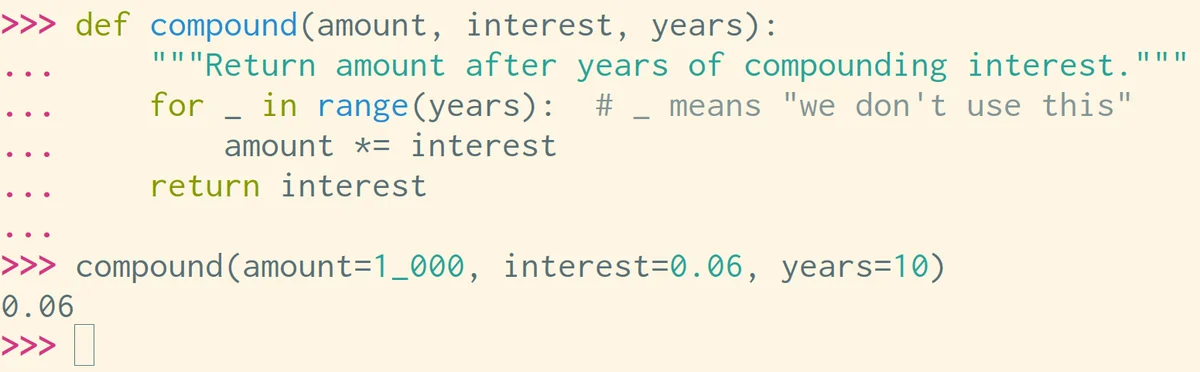
Python 3.14 will introduce syntax highlighting to the REPL, allowing users to customize their color schemes. Installing Python 3.14 can be done using the command uv run --python 3.14 python. The author demonstrates how to customize the REPL's syntax highlighting to match their Solarized Light text editor theme using an internal, undocumented module _colorize. This code modifies keywords, built-ins, comments, strings, and numbers. To enable this customization automatically, a PYTHONSTARTUP file can be configured. The author sets their PYTHONSTARTUP environment variable to ~/.startup.py which contains a _main function to apply the custom theme. This function is called and then deleted to avoid polluting the REPL's global scope. The code includes error handling for older Python versions. The author acknowledges that the _colorize module is internal and subject to change in future Python releases. The possibility of packaging these themes using .pth files in the site-packages directory is also discussed as a more installable solution. The author invites readers to share their own REPL theme preferences.

uv run --python 3.14 python. The author demonstrates how to customize the REPL's syntax highlighting to match their Solarized Light text editor theme using an internal, undocumented module_colorize. This code modifies keywords, built-ins, comments, strings, and numbers. To enable this customization automatically, aPYTHONSTARTUPfile can be configured. The author sets theirPYTHONSTARTUPenvironment variable to~/.startup.pywhich contains a_mainfunction to apply the custom theme. This function is called and then deleted to avoid polluting the REPL's global scope. The code includes error handling for older Python versions. The author acknowledges that the_colorizemodule is internal and subject to change in future Python releases. The possibility of packaging these themes using.pthfiles in the site-packages directory is also discussed as a more installable solution. The author invites readers to share their own REPL theme preferences.