DEV Community
Follow
Why I Built a Notch App for My AI Coding Agents
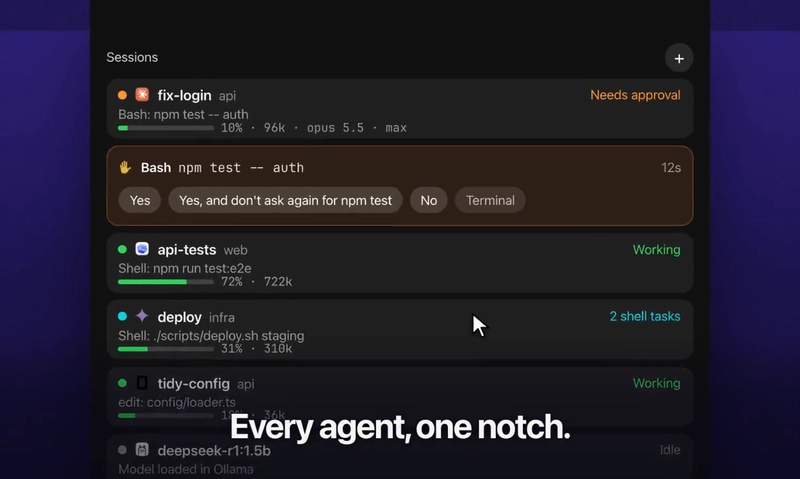
The author previously struggled with managing multiple AI agent sessions running in separate terminal tabs. To solve this, they developed a macOS app called Notch Crew. This app consolidates all agent sessions into the MacBook's notch area for better visibility. Each agent session is displayed on its own row, showing status, context, tokens, model, and mode. The app indicates when an agent has pending shell tasks rather than just being idle. When an agent requires permission, Notch Crew presents the same choices as the terminal, allowing direct interaction. Users can install and remove hooks easily, and the app provides transparency on what is added. Notch Crew also enables users to type directly into a session or drop files onto it, with support for various terminal emulators. Conversations can be handed off between agents, and past sessions can be resumed from a recent sessions list. Sessions opened by the notch do not require a visible terminal window, significantly reducing power consumption compared to traditional terminal sessions. Terminal windows, whether active or backgrounded, consume considerably more power. The notch itself uses minimal CPU and power. Notch Crew operates locally on the Mac, reading session files and only making external calls for updates and purchases. It supports Claude Code, Codex CLI, Gemini CLI, OpenCode, and Ollama models, and requires macOS 14 or later on Apple silicon or Intel processors. The author is seeking feedback from users who also manage multiple parallel agents.
https://dev.to/taste_kim_2dec5824a9065cd/why-i-built-a-notch-app-for-my-ai-coding-agents-55oi dev.to