UX Collective | Medium
Follow
You design it. Then what? A clear map of the Figma-to-code AI mess
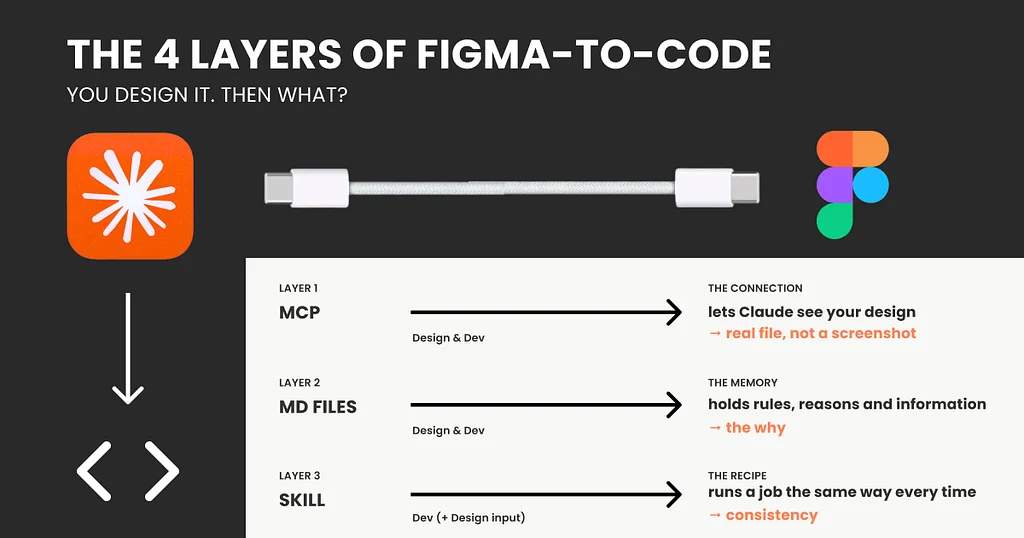
The journey from design to code with AI is complex and not fully realized, often misleadingly demonstrated in simplified demos. This complexity stems from multiple layers that must work together to translate designs into functional code. The first layer, the Model Context Protocol (MCP), acts as a standardized connection, allowing AI models like Claude to access and understand design files directly, rather than just images. This fixes the AI's inability to see design details but doesn't grant it access to existing code components.Layer two involves markdown (md) files, which act as memory for the AI, storing design rules, reasoning, and guidelines that aren't evident in the design file itself. These plain text files provide context for the AI, informing its decisions and ensuring consistency. However, markdown files are advisory, not enforceable rules, and can become outdated or too large to be effective.The third layer introduces skills, which are specific sets of instructions or code that tell the AI how to perform a particular task consistently, like a recipe. Skills are activated only when needed, ensuring repetitive tasks are executed uniformly. While skills automate processes, they still require manual creation and updating, and don't inherently link to the design's existing code components.The final layer, mapping, is the crucial step that bridges the design and code worlds, requiring developer involvement. This layer formally links specific design elements in software like Figma to their corresponding actual code components in the codebase. Tools like Code Connect enable this, ensuring the AI uses existing, functional components rather than generating duplicates. This mapping establishes a single source of truth but demands ongoing maintenance by developers, making it a resource-intensive process.