Angular Blog | Medium Note

Angular Blog | Medium

The website appears to be the official blog of Angular, a web application framework. The homepage displays a list of recent blog articles titled such as "10th Anniversary of The Angular Project". Common themes include technology, development, and Angular itself. There is a search bar along with categories, tags, and an about page. It provides resources, updates, and tutorials related to the Angular framework.

Thread Of Notes

Angular in 2026: Mid-Year Reality Check, Signals, and AI Code Quality!

It is now halfway through 2026, prompting a review of the year's framework predictions. Experts are reassessing their 2026 Angular forecasts to see which have materialized. AI-assisted tooling is transforming Angular development through the Model Context Protocol. This advancement allows tools to understand workspaces beyond basic scaffolding. A rapid recap of Angular v21 is available, along with a video addressing AI's tendency to write outdated Angular code. A free, comprehensive course on modern Angular features and best practices has been released. Developers can now check if their Angular apps are prepared for a zoneless architecture. This move towards zoneless is a significant step for high-performance Angular applications. The introduction of Signals is highlighted as a major architectural shift in Angular development. A podcast episode discusses how to effectively adopt Signals for reactive programming.
CdXz5zHNQW_HBxk0F1asR.png

Announcing Angular v22

Angular has released version 22, focusing on stability and developer experience. This update brings three significant features to production readiness: Signal Forms, Angular Aria, and Asynchronous Reactivity APIs. Signal Forms offers a composable and reactive solution for building forms, now with complete documentation and community feedback addressed. Angular Aria provides accessible primitives for building inclusive web applications, with stabilized APIs and test harnesses. The Asynchronous Reactivity APIs, including the new resource and httpResource, enable developers to leverage asynchronous programming within signals for improved data fetching. The release also emphasizes Angular's role in AI development, introducing agentic tooling for code authoring and AI development platforms. This includes updated Model Context Protocol (MCP) tools for better agent interaction with the development server and Angular Agent Skills to provide AI agents with context on modern Angular development. Experimental support for WebMCP is also included, allowing structured tool exposure for agent interaction within the browser. Furthermore, Angular is enhancing AI development platforms like Google AI Studio and Gemini Canvas to empower builders with the framework's strengths. Developers can prototype directly in the browser and use simplified prompting for Angular app generation. These advancements aim to make Angular a robust foundation for building the next generation of web applications.
CdXz5zHNQW_8wHqe4x7uv.jpeg

Mastering Dynamic Components, HTTP Resources, and AI Writing Assistants ️

This text highlights several Angular repositories offering practical learning experiences. Antonio Cardenas showcases advanced dynamic component creation using ViewContainerRef, providing a code repository and StackBlitz demo. He also offers a "Vibe Coding" template for quick CRUD project starts. Deborah Kurata introduces a Signal-based httpResource with a "Pirates" example. Ankit Sharma demonstrates an Angular app integrating Google Gemini for real-time grammar correction. These examples are perfect for learning the latest Angular patterns and integrating AI assistance. The repositories cover topics like dynamic components, CRUD, and data fetching with reactive primitives. These resources are designed for both beginners and experienced Angular developers. The text encourages the Angular community to share their own projects. Developers are prompted to share their repositories and StackBlitz demos using relevant hashtags. Collaboration and sharing are emphasized to foster community growth. The text promotes hands-on learning through code exploration and practical projects.
CdXz5zHNQW_2YonmPl0Up.png

Back from Baby Bonding: Agents, Building Blocks, and the Future of AI Engineering

The author, a developer, returned from baby bonding leave to a rapidly changing AI landscape, particularly agent skills. Agent skills, collections of instructions for AI agents, sparked a rethinking of a previous project, the Angular AI Tutor. The tutor teaches Angular interactively, initially built with a simple rules file and Gemini. However, the project faced challenges in lesson continuity and syntax recency as it evolved into an interactive product. The tutor's logic was tightly coupled, hindering reusability and making updates difficult. A proposed solution, a Router + Building Blocks architecture, aimed to create modular, reusable components for the tutor. The author now sees Agent Skills as the potential vehicle for this vision of Context Pipeline Engineering. The author questions the extensibility, reliability, token optimization, and stability of these systems. Ultimately, the author considers the deeper, structural questions about AI engineering. The author calls this discipline Context Pipeline Engineering and invites others to join the exploration. The article concludes with the author's excitement about returning to work and building new things.
CdXz5zHNQW_TJ5I7pFWcs.png

AI Training, Local Gemini, and Styling Signal Forms

The Angular community is innovating with AI and accessibility. Developers are exploring ways to build smarter and more beautiful applications. Fanis Prodromou demonstrated auto-styling form states with Angular Signal Forms and custom CSS. Daniel Herrera Sanchez showcased a cognitive training app called "Mind Palace AI" built with Angular and Gemini 3.0. Mariano Alvarez provided guidance on reducing AI hallucinations when using the Gemini CLI in Angular projects. He also explained how to run Gemini locally and for free within Angular applications using Chrome's AI capabilities. Connie Leung shared a photo editing app code sample utilizing Google Nano Banana and Firebase AI. She also presented an AI Alt Text and Text-to-Speech generator using Gemini 2.5 Flash TTS for accessibility. These examples highlight advancements in image processing and text-to-speech functionality. Developers are encouraged to share their AI and accessibility projects using #AngularSparkles and #AngularAI.
CdXz5zHNQW_LTVi8GCpER.png

Mastering Dynamic Components, HTTP Resources, and AI Writing Assistants ️

This week's focus is on practical Angular learning through code examples. Several repositories demonstrate modern Angular patterns and Google Gemini integration. One repository shows advanced dynamic component creation using ViewContainerRef for scalability. Another offers a ready-made CRUD template to accelerate project development. Signals-based httpResource is showcased through a "Pirates" example for data management. An AI-powered grammar assistant app integrates Google Gemini for real-time corrections. These hands-on examples offer blueprints for incorporating AI into Angular applications. Developers are encouraged to share their own Gemini and httpResource projects. The author encourages others to use the specified hashtags to showcase personal projects. This collaborative approach enhances the Angular community's learning. These examples are perfect for learning and building. The provided GitHub links allow direct exploration of the code implementations.
CdXz5zHNQW_COGp4RGvqe.png

Local AI, Reactive Routing, and the Vitest Migration! ⚡

The Angular community is actively exploring advancements beyond the typical browser environment. Sonu Kapoor highlights running AI models locally in the frontend, leveraging ONNX for improved privacy and reduced latency. This approach suggests a significant architectural shift towards client-side processing. Kapoor also provides a guide to using Angular Signals for creating responsive inputs and managing complex routing. Fanis Prodromou offers a retrospective on Signals, examining its evolution and impact on Angular development. Kevin Davila's series focuses on building custom form controls using the Signal Forms API. Johannes Hoppe provides a comprehensive guide on migrating Angular test suites to Vitest. This migration to Vitest is recommended for its performance benefits. The provided resources offer guidance for both German and English speakers. The community is encouraged to share their experiences and insights. The use of #AngularSparkles and #Vitest is promoted to foster collaboration.
CdXz5zHNQW_uCnt9ZbsaU.png

Modernize Your Workflow: AI Tooling, Deferrable Views, and the Era of Forms! ️

Angular development is rapidly evolving with new tools and techniques. Experts are sharing resources to help developers stay up-to-date with these changes. Daniel Herrera Sanchez explores using AI tools like Cursor and Claude with the Model Context Protocol (MCP) to automate code. He also provides a tutorial on using the `@defer` syntax to optimize app performance. Alisa Duncan details essential tools within the MCP toolkit for Angular 21, including both stable and experimental options. Damian Sire experiments with Angular's MCP Server, using AI for "Vibe Coding" to generate complex patterns. Modeste ASSIONGBON highlights improvements in form logic, showcasing the move to plain object validators for better code readability. He then provides a guide to Signal Forms, a reactive approach to modern form state management in Angular. These resources cover a range of modern Angular topics. The community is encouraged to share their experiences with AI and MCP in Angular for further innovation. This progress represents the ongoing modernization of the Angular development workflow.
CdXz5zHNQW_3ydB0yqdQy.png

Security Advisory: Addressing Recent Vulnerabilities in Angular

Security updates have been released to address two Server-Side Rendering (SSR) vulnerabilities in Angular. These vulnerabilities include Server-Side Request Forgery (SSRF) and Header Injection, along with an Open Redirect flaw. The SSRF vulnerability allowed attackers to potentially manipulate HTTP headers to access unauthorized domains. The Header Injection vulnerability stemmed from Angular's trust in user-controlled headers for URL reconstruction. An open redirect vulnerability was discovered in how Angular handles the `X-Forwarded-Prefix` header. This could lead to redirection to malicious websites if the `X-Forwarded-Prefix` header wasn't sanitized properly. Developers are urged to update their SSR applications to the latest patch version as soon as possible to mitigate these risks. If not using SSR, updating is less urgent, but still recommended. Workarounds include using absolute URLs and implementing strict header validation in server configurations. Sanitizing the `X-Forwarded-Prefix` header serves as an additional workaround to the open redirect issue. The report encourages responsible disclosure and highlights Google's VRP program. Keeping infrastructure up-to-date is crucial for security patch deployment.
CdXz5zHNQW_4yE6gQETxG.png

Angular 21: Internal Mechanics, ARIA, and AI-Powered Coding!

Angular's momentum continues with the release of Angular 21, sparking excitement within the community. Experts are sharing resources to help developers understand and utilize the new features. Alejandro Cuba Ruiz and Jorge Cano demonstrate building pages quickly using Gemini CLI and Angular's Model Context Protocol (MCP). Ferdinand Malcher, Johannes Hoppe, and Danny Koppenhagen offer an in-depth exploration of Angular Signals' internal workings. Deborah Kurata provides a comprehensive overview of Angular 21 in both English and German. Carlos Caballero offers specialized series on Angular ARIA for accessibility and a complete course on Signals, both in Spanish. Arcadio Quintero guides developers on modernizing their Angular workflow using MCP and AI tools. The community is encouraged to share their progress and implementations using the hashtag #AngularSparkles. These resources aim to help developers build more accessible and modern applications. This information is meant to encourage Angular developers to stay ahead of the curve.
CdXz5zHNQW_3Vc62aUcTN.png

Global Expertise: AI Blueprints, Resource API Fixes, and Angular v20

This week's Angular roundup highlights the global community's advancements. It features AI integrations and deep dives into Angular v20's new features. Damian Sire presents a GenAI scaffold, a blueprint using Angular, Node.js, and Google Gemini API. Wayne Gakuo demonstrates an AI-powered movie recommendation engine using Angular, Genkit, and Firebase. Alejandro Cuba Ruiz interviews Mark Techson on Angular and AI in Spanish. Johannes Hoppe analyzes Angular's Resource APIs, suggesting improvements. Fannis Prodromou provides a beginner's guide to Angular Signal Forms. Modeste Assiongbon offers a three-part French series on Angular v20 updates. The topics cover topics like asynchronous redirects, Resource API changes, and the new style guide. The community is encouraged to share their work using #AngularSparkles. These resources are designed to help developers globally enhance their skills.
CdXz5zHNQW_aRsRFlTnqj.png

Community Stories, Code Samples, and Signal Forms!

This week's highlights feature the Angular community's commitment to sharing knowledge and practical coding examples. Sonu Kapoor shares an inspiring story detailing their transition from ASP.NET to becoming an Angular MVP, offering valuable insights for career changers. Ferdinand Malcher and Danny Koppenhagen present a comprehensive three-part series on mastering Angular's new Signal Forms API. Babatunde Lamidi provides a complete code sample demonstrating how to build an AI-powered content generator using Angular and the Gemini API. Antonio Cardenas offers real-world guidance and code examples for modernizing Angular applications utilizing the new Control Flow syntax. These resources cover a wide range of topics, from personal journeys to hands-on coding. The featured content emphasizes practical application and provides readily available code samples for developers to utilize. The blog encourages community engagement by asking about experiences with Signal Forms and Control Flow. It calls for sharing favorite Angular resources using the #AngularSparkles hashtag. The community is working together to grow and enhance the Angular development landscape.
CdXz5zHNQW_DD1Qttebfw.png

Announcing Angular v21

Angular v21 is released, offering new tools and enhancements for developers, aligning with an AI and adventure theme. It introduces experimental Signal Forms for scalable, reactive form management with built-in validation. Angular Aria is now in developer preview, providing unstyled, accessible UI components for custom styling. The MCP server for AI agents is stable, offering tools to access Angular context and features. Vitest is now the default, stable test runner, replacing Karma for new applications. New Angular applications no longer include zone.js by default, promoting zoneless change detection for improved performance. The documentation site, angular.dev, has been updated with new content and tutorials, including a dedicated section for AI development. Significant improvements have been made to guides on routing, dependency injection, theming, and Tailwind CSS integration. The Signal Forms API is experimental and welcomes developer feedback for iteration. Angular Aria aims to empower developers to build accessible, styled UI components.

Handling Time and Mock Clocks in Tests

Mock clocks are valuable in software testing for faking dates, speeding up time-consuming operations, and preventing timer leakage between tests. They also help execute all pending timers to stabilize test environments. Traditional mock clocks, however, can introduce complexity and anti-patterns, especially with modern JavaScript's asynchronous capabilities. Forcing synchronous tests for asynchronous logic can lead to unrealistic execution orders and obscure timing bugs. Tests often become cluttered with arbitrary hard-coded timer advancements, making them brittle. Some test utilities might also interfere with the intended timing of a mock clock. To address these issues, the concept of "auto-advancing" mock clocks is being explored. The goal is for mock clocks to advance time realistically, simplifying tests and making them more predictable. This feature aims to allow tests to run with mock clocks without requiring significant changes to existing code. Examples demonstrate how auto-advancing mock clocks seamlessly handle asynchronous functions and waiting for conditions. Test framework authors are being engaged to support this functionality. Libraries like Jasmine and @sinonjs/fake-timers are already incorporating auto-advancing capabilities. This advancement promises faster and more predictable asynchronous tests across various web frameworks.
CdXz5zHNQW_D2PfQNkESJ.png

Angular support for generating apps in Google AI Studio is now available

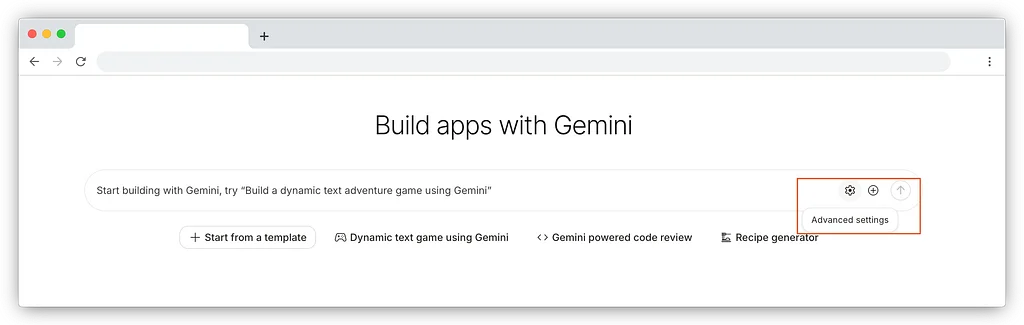
Google AI Studio now supports generating Angular applications. This collaboration aims to bring Gemini's AI power to the Angular developer community. Developers can access this feature through the "Build" tab in AI Studio, starting at no cost. To generate Angular code, users must first select the "Angular (TypeScript)" framework template in the advanced settings. After selecting the template, users can input prompts for their desired application. Gemini will then generate the Angular application based on the provided prompt. This integration significantly accelerates application prototyping and development, reducing initial timelines from weeks to days. Beyond code generation, AI Studio allows for building AI-powered apps leveraging the Gemini API. The generated applications can be easily deployed to Cloud Run for a serverless environment. Code can also be exported to GitHub for version control and collaboration. Sharing generated applications for feedback and proof of concept is also streamlined. Developers are encouraged to try this new feature at goo.gle/angular-ai-studio and share their creations using #AngularInAIStudio.
CdXz5zHNQW_efWO6p8BJv.png

Beyond the Horizon: How Angular is Embracing AI for Next-Gen Apps

The Angular team has introduced the Web Codegen Scorer tool to enhance AI-driven web code generation. This tool helps optimize LLMs for Angular's current framework state and aids in integrating evolving application features. It assists in analyzing and debugging common LLM failures, enabling faster iteration on improvements. The Web Codegen Scorer was developed in collaboration with AI, security, and accessibility experts for robust evaluation. Angular also collaborated with the SolidJS team, demonstrating the tool's potential to improve code generation for other frameworks. The tool is open-sourced to encourage community contributions and broader framework adoption. Angular v20.2 includes the Angular MCP Server, providing coding agents with built-in tools for development sessions. Future MCP server features include modernization tools for syntax migration and a local RAG engine for up-to-date AI information. Angular support has been integrated into Google's AI products, Gemini Canvas and Google AI Studio. The team is also exploring an AI-first framework, focusing on agent capabilities for large codebases and minimizing common LLM issues. They are experimenting with authoring formats and application structures, promising transparency in future Angular developments. The Angular team is committed to supporting developers in building scalable, AI-powered applications.
CdXz5zHNQW_J8s9Nu3Qbl.png

Angular Summer Update 2025

Angular has released minor updates v20.1 and v20.2, focusing on developer productivity and AI enhancements. A major highlight is the production readiness of zoneless Angular, offering benefits like smaller bundle sizes and improved debugging. New animation primitives, animate.enter and animate.leave, allow easier integration of native CSS animations and deprecate the old @angular/animations package. The team is expanding AI offerings with guides for building AI-powered apps and improving AI-assisted coding tools. They are also working on an experimental MCP server to support AI needs like documentation search and best practices for LLMs. Angular DevTools now includes route visualization and signal graphs for better debugging. Component testing has been simplified with support for passing binding objects to TestBed.createComponent. The Mat Menu component can now function as a context menu, and NgComponentOutlet supports custom EnvironmentInjectors for dynamic components. Further improvements include a revamped routing guide, a new currentNavigation signal, a destroyed property on DestroyRef, and better support for template operators and ARIA attributes. Angular now supports TypeScript 5.9 and has made improvements to httpResource and httpClient. The community provided significant feedback for the new Angular mascot, with a final design to be revealed later this year.
CdXz5zHNQW_bylcGSZJTi.png

The Angular Custom Profiling Track is now available

The Angular and Chrome teams have collaborated to bring Angular-specific data and insights directly into the Chrome DevTools performance panel, creating a unified profiling experience for developers. This integration allows developers to combine the benefits of both tools, offering a more synchronized and comprehensive view of their application's performance. The new custom track for Angular in Chrome DevTools provides performance data using Angular concepts, such as application bootstrap, components, UI synchronization, and lifecycle hooks. The custom track's flame charts group function invocations together under corresponding components and other Angular concepts, allowing developers to drill down to individual functions for a more granular view. The flame chart entries are color-coded to help developers quickly identify what's happening in their application, distinguishing between application code, other scripts, or browser activities. The colors represent different aspects of the application, such as Dependency Injection services, templates compiled by Angular, and entry points. The custom track is interactive, allowing developers to click on an entry in the flame chart to reveal more detailed information about a given entry. To get started, developers need to ensure they are using the latest version of Angular and an up-to-date version of Chrome, run their Angular application in developer mode, and enable the custom track by typing ng.enableProfiling() in the console. This integration demonstrates the ongoing commitment to improving the developer experience within the Angular ecosystem, empowering developers to build faster, more efficient applications.
CdXz5zHNQW_arec9d2R1S.png

Announcing Angular v20

Angular has made significant advancements in the past couple of years, including reactivity with Signals and zoneless applications. The latest release, Angular v20, focuses on polishing in-progress features for a solid developer experience. The release stabilizes APIs like effect, linkedSignal, and toSignal, and promotes zoneless to developer preview. It also improves debugging with Angular DevTools and partners with Chrome for custom Angular reporting directly in Chrome DevTools. The release polishes the developer experience with style guide updates, type checking, and language service support. Additionally, it advances GenAI development and launches a request for comments for an official mascot for Angular. The release promotes reactivity features to stable, including signal, computed, input, and view queries APIs. It also introduces experimental APIs, including the resource API and httpResource, to tackle managing asynchronous state with Angular. Furthermore, it promotes zoneless to developer preview and solidifies Angular on the server with incremental hydration and route-level render mode configuration. Finally, it polishes the developer experience with performance insights in Chrome DevTools and framework additions and improvements.
CdXz5zHNQW_t5gWIMi5Tb.png

Build AI-Powered Apps With Genkit and Angular

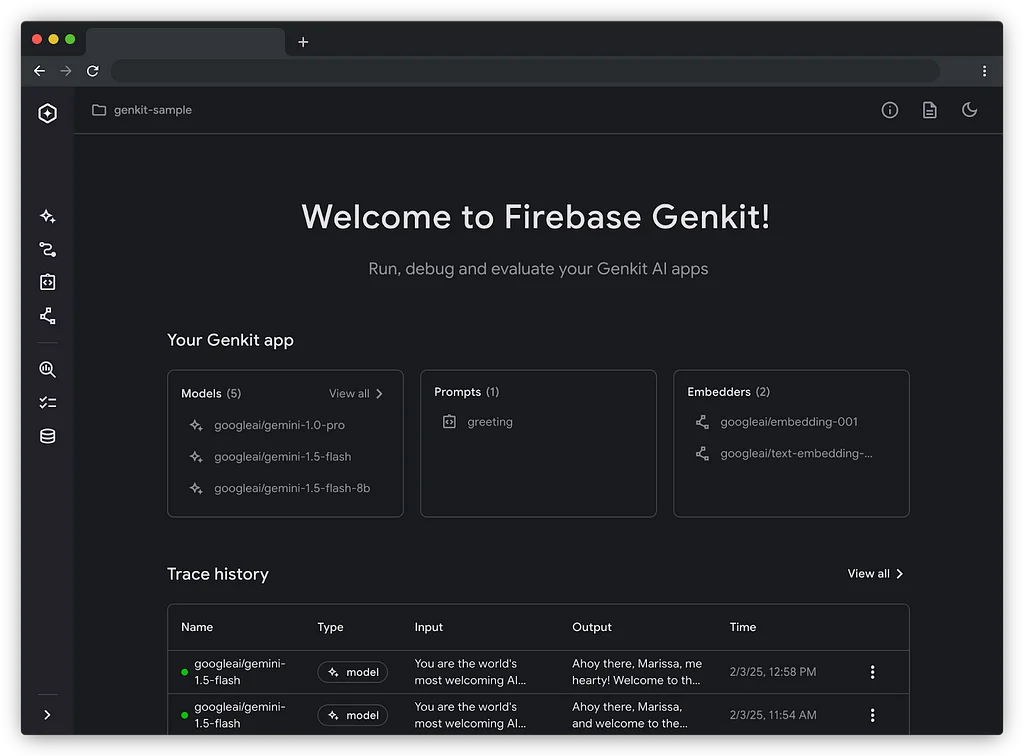
Genkit 1.0, a framework for building AI applications, is now available for Node.js and Go, enabling production-ready AI integrations. It's designed for server-side use and offers open-source libraries and developer tools. Angular developers can leverage Genkit via a Node.js backend, integrating Genkit's APIs into their server-side code. A straightforward example shows connecting to a model like Gemini 2.0 Flash and generating text. For enhanced user experience, Genkit's streamFlow API enables streaming responses, creating an "AI typing" effect. Server-side flows are defined using Genkit's defineFlow API and structured responses with Zod schemas. The Genkit CLI and Developer UI provide tools for testing, debugging, and observing AI interactions. Genkit supports various features like multi-turn conversations, tool use, and human-in-the-loop workflows. By simplifying AI integration, Genkit empowers developers to build innovative AI-powered web applications using Angular and Firebase. Further information and updates are available on angular.dev and firebase.google.com/docs/genkit.
CdXz5zHNQW_cIunLKUSoL.png

Seamless data fetching with httpResource

Angular is introducing new APIs, including the experimental resource() API, which allows developers to expose the results of asynchronous operations as signals. The httpResource API is built on top of the resource primitive and uses HttpClient as a loader, making it easier to facilitate HTTP requests. httpResource acts as a frontend for @angular/common/http and makes HTTP requests through the Angular HTTP stack, including interceptors. By default, an httpResource performs a GET request and returns an unknown typed JSON response. It differs from the HttpClient as it initiates the request eagerly, and if any source signals in the request computation change, a new HTTP request will be made. httpResource allows for advanced requests by defining a request object similar to HttpClient's request. The API has dedicated methods available for other response types, such as text, blob, and arrayBuffer. An httpResource exposes several signals, including value, status, error, isLoading, headers, statusCode, and progress. The httpResource offers direct integration with schema validation libraries like Zod or Valibot for type safety. The httpResource is available as an experimental API in Angular v19.2 and is not yet ready for production, but developers are encouraged to try it out and provide feedback.
CdXz5zHNQW_4lkhfMb8Ye.jpeg

Angular 19.2 Is Now Available

Angular has released version 19.2, which includes new APIs and experimental features to enhance the development experience. The release expands reactivity beyond synchronous operations with the introduction of asynchronous reactivity using the new httpResource and resource streaming with rxResource APIs. The resource API allows developers to interact with asynchronous data sources while leveraging the benefits of signals. The httpResource API provides a low-friction reactive way to fetch data over HTTP, participating in Angular's reactivity system with signals. The rxResource API now supports streaming multiple responses, making it useful for scenarios where multiple values are returned from an endpoint. Angular templates have also been improved with the support for untagged template literal expressions, making string concatenation and escaping easier. Other updates include new migrations, such as converting to self-closing tags and supporting the Set type in forms. The Angular team is seeking feedback on the resource API through a request for comments. Angular v19.2 is now available for developers to update and start building great apps. New developers can start building with Angular by visiting angular.dev/tutorials.
CdXz5zHNQW_JLU0SNkg19.png

Micro Frontends with Angular and Native Federation

Enterprise-scale software systems are often implemented by multiple cross-functional teams, and to enable these teams to provide new features efficiently, it is desirable to minimize the need for coordination between them. This calls for a modularization that verticalizes the system into low-coupled areas individual teams can take care of. Micro Frontends is an architectural style that promises several advantages, such as a high amount of team autonomy, but it also comes with numerous challenges. Micro Frontends result in separate build processes, which can be combined with incremental builds to improve build-time. This feature can also be used without applying other aspects such as aligning teams with individual applications or separate deployments. However, individually developed Micro Frontends can diverge in UI/UX, leading to an inconsistent appearance, and loading several applications increases the number of bundles that need to be downloaded, adversely affecting loading times and increasing the memory pressure. Splitting an application into low-coupled parts might be a best practice in general, but it is often hard to define the boundaries between verticals clearly enough to implement them as individual applications. Integrating them into an overarching solution brings additional complexity, and moving away from a compile-time integration towards a runtime integration has severe consequences. The Angular team recommends checking if alternatives, like implementing the individual verticals in Monorepos, are suitable. However, there are also ways to compensate for the disadvantages of Micro Frontends, such as establishing a design system to help with a consistent UI/UX or lazy loading individual system parts. Native Federation is a community project that provides close integration with the Angular CLI and allows for the implementation of Micro Frontends with Angular. It enables an application to load parts of other separately built and deployed applications lazily and can share dependencies like Angular or RxJS between the host and remotes. To set up Native Federation, a schematic is provided, which configures the Native Federation builder delegation to the ApplicationBuilder and creates a configuration file federation.config.js. The configuration assigns a unique name to the remote or host and defines which dependencies to share. Remotes also define exposed EcmaScript modules that can be loaded into the shell. The schematic also adds code to initialize Native Federation to the main.ts, and to load a component or routing configuration exposed by a remote, traditional lazy loading is combined with Native Federation’s loadRemoteModule function.
CdXz5zHNQW_NpT7gwgsMy.png

Angular 2025 Strategy

The Angular team has been focused on improving developer experience and performance for the past two and a half years. Due to the rapidly evolving tech industry, the team defines a long-term vision and plans work on an annual, quarterly, and release basis, staying flexible to adapt to changing requirements. The team uses an annual developer survey to validate assumptions about developers' needs, with over 10,000 responses received in 2024. The survey results show that 79% of developers are using the latest two major versions of Angular, and 90% are using standalone components, directives, and pipes. The results also indicate an improvement in overall developer satisfaction, with close to 90% of developers reporting satisfaction with the framework. The team identified improvements such as standalone components, built-in control flow, and deferrable views as contributing to the satisfaction increase. However, component authoring format and testing remain key areas for improvement. In 2025, the team will focus on investing in key areas to help Angular developers succeed, including enhancing developer experience, enabling adoption of the latest improvements, and optimizing for performance. Notable projects for 2025 include promoting zoneless to developer preview, introducing signal-based forms, and replacing Karma with a new default test runner. The team will also evolve Angular's documentation to reflect the latest best practices and increase the visibility of features that help web developers meet their goals.
CdXz5zHNQW_Q8whPTKrhS.png

Try Out the New Signal Input Migrations

The Angular team has introduced a new migration to help developers update their decorator-based inputs to the new signal API. Signal inputs provide updates to the input functionality while maintaining feature parity with decorator-based inputs. One of the primary reasons to update is type-safety, which enables developers to remove brittle code patterns. Signal inputs also make input monitoring simpler. The new API can be used to refactor code that uses the ngOnChanges lifecycle hook to track updates to inputs. The migration can be run via the Angular CLI or as code refactoring actions in VSCode. The tooling will update the @Input declarations and adjust references to inputs, introducing variables where necessary. The migration is configurable and features options to help choose the right strategy to migrate code. The Angular team is excited to continue moving forward and realizing their vision for a new reactivity model. The new signal API is expected to simplify the mental model of Angular developers and make it easier to reason about state synchronization and flow.
CdXz5zHNQW_r3Skdt6pNI.png

Meet Angular v19

In the past two years, the Angular team has focused on improving developer experience and performance in every release. The latest version, v19, introduces several new features and improvements, including incremental hydration, route-level render mode, and enhanced developer experience. Incremental hydration allows developers to specify which parts of the template should be loaded and hydrated on specific triggers, improving performance. Route-level render mode enables configuration of individual routes to be server-side rendered, prerendered, or rendered on the client side. Developer experience improvements include hot module replacement for styles and experimental support for template HMR, standalone defaults to true, strict standalone enforcement, and a new testing tooling setup.

Angular v19 Release: Join the Watch Parties!

The Angular v19 release is approaching, and developers are preparing to celebrate. The Angular v19 Developer Event will take place on November 19th at 9AM Pacific. To mark the occasion, several watch party events are being organized around the world. In Buenos Aires, a watch party will be livestreamed on YouTube on November 19th. In France, multiple in-person watch parties will be held in Nantes, Tours, and Paris on November 19th, with registration available on Eventbrite. Angular Athens is hosting a virtual watch party on Discord on November 19th. The Angular Singapore Meetup is organizing an in-person meetup on November 19th, with registration available on LinkedIn. These watch parties provide a great opportunity to learn about the latest Angular features, network with other developers, and share excitement about the major release. They offer a chance to connect with the Angular community and celebrate the new release. Don't miss out on these events and mark your calendars for November 19th.

Latest updates to effect() in Angular

Angular's developer preview process allows developers to try out APIs and features before they are promoted to production, and enables the Angular team to adjust those APIs based on real-world usage and feedback. Through feedback on the effect() API, the team has identified several improvements to the design that will address real issues with functionality and developer experience. One of the changes is the removal of the allowSignalWrites flag, which was intended to encourage good patterns but ultimately discouraged usage of effect() in cases where it would be reasonable to update signals. Instead, the team will focus on other ways of encouraging good patterns, including the addition of new reactivity helpers where needed. The timing of when effects run is also being changed, with effects now running as part of the component hierarchy during change detection. This change aims to make effect timing more predictable and useful, and resolve bugs around effects running too early or too late. Most uses of the effect API will continue to work as expected, but some use cases may be impacted, such as effects against view query results and toObservable() of input signals. The Angular team has fixed around 100 cases where the timing change meaningfully impacted code during testing at Google. As a result of these changes, the effect() API will remain in developer preview through at least v19.0, with plans to stabilize the API in an upcoming minor release. The Angular team thanks the community for their feedback and support, which has played a crucial role in the development of Angular.

The future is standalone!

In Angular v19, the default for components, directives, and pipes will be set to standalone: true, making it easier to write Angular code. This change follows the success of the standalone feature introduced in v14, which has been widely adopted across the Angular ecosystem. The standalone feature simplifies route-level lazy loading, enables a better composition model for component behavior, and allows for the lazy loading of components and directives at the template level. Existing standalone components will have standalone: true removed as part of the ng update for v19, while existing NgModule components will have standalone: false added to ensure they continue to work. The strictStandalone compiler option can be set to enforce that only standalone components are written in an application. Nothing will change for FormsModule and other npm libraries with NgModules, and standalone components can continue to import NgModule dependencies as needed. Library authors do not need to make any changes, as their components will behave correctly when imported by users regardless of the version.
Using isolatedModules in Angular 18.2

Angular 18.2 introduces TypeScript isolatedModules support, offering significant performance enhancements. By enabling this option, TypeScript code is transpiled via the bundler, resulting in up to 10% faster production build times. The bundler, esbuild, optimizes output code, including inlining enums, and removes Babel optimization passes for TypeScript code. To enable this feature, add "isolatedModules": true to the "compilerOptions" section of your tsconfig.json file. Ensure the "useDefineForClassFields" option is removed or set to true for optimal output size. To learn more, refer to the TypeScript documentation on isolatedModules. By implementing these changes, developers can leverage this feature to improve build performance and create efficient Angular applications.

The Future of Material Support in Angular

Google's Material Web Components (MWC) changes do not affect Angular Material, as it does not use or depend on MWC. Angular Material employs MDC Web internally and is transitioning to forking and iterating on the code from MDC Web within Angular Material, which will not impact component APIs or output. Angular Material's latest release includes Material 3 styles, CSS variable support, and theming schematics. The team plans to expand Angular CDK features and documentation for improved app development. Angular Material remains actively supported and under development, offering developers robust tools for building high-quality UIs.

Immerse Yourself in Generative Art: An Angular WebXR Adventure

The Google I/O Angular session showcased the Generative Art Gallery demo, combining AI, Angular, and WebXR technologies. The demo leverages Vertex AI's Imagen API for artwork generation, Gemini API for insightful explanations, and displays the artworks in a 3D gallery. Accessible via browsers, AR, or VR, the gallery offers an immersive experience. Angular's Deferrable Views ensure a seamless user experience by loading 3D models in the background while maintaining the placeholder view. Signals simplify data flow and reduce boilerplate code. WebXR Components abstract scene creation and reduce boilerplate. Server Side Rendering and Hydration significantly improve performance, with notable improvements in first and largest contentful paint times. Angular's advancements enhance the developer experience with ease of use and new APIs. The demo code is available on GitHub, inspiring developers to create their own Angular, WebXR, and AI projects.

Introducing @let in Angular

Angular introduces a new @let syntax, allowing developers to define and reuse variables within templates. This syntax addresses a long-standing issue in Angular's template syntax. @let declarations enable the definition of variables with values derived from Angular expressions. These variables can then be reused throughout the template, improving code readability and maintainability. Unlike previous solutions, @let variables are scoped to the current view and its descendants, enhancing code organization and preventing unwanted variable collisions. @let declarations are read-only and their values are recomputed during change detection, ensuring data accuracy. The formal syntax of @let includes the keyword, a variable name, the assignment operator, an Angular expression, and a semicolon terminator. Examples illustrate the use of @let to define variables for display in the template, including complex expressions using async pipes. Angular team encourages feedback on the new @let syntax to continue improving the developer experience.

Angular v18 is now available!

Angular 18 introduces experimental zoneless change detection, offering improved performance, composability, and debugging. Angular.dev becomes the official documentation website, providing an enhanced user experience. Material 3 components, deferrable views, and built-in control flow are now stable, along with i18n support for server-side rendering hydration. Native async/await is available for zoneless apps, reducing bundle sizes and improving debugging. The event dispatch library from Google.com powers event replay in Angular, preserving user events during page loading. Angular DevTools provides improved debugging for hydration processes. All Angular Material and CDK components are now fully hydration compatible. Partial hydration is in development, enabling incremental hydration after server-side rendering. Zoneless change detection enhances composability for micro-frontends and interoperability with other frameworks. Deferrable views improve Core Web Vitals, while built-in control flow offers better performance and ergonomics.

Event Dispatch in Angular

Angular's new event delegation system, inspired by Angular and Wiz, enables Event Dispatch, capturing events before hydration. This prevents unresponsive UI elements and improves user experience. Event Dispatch uses JSAction, a battle-tested library used by Google applications. By enabling Event Dispatch, Angular applications can stop dropping events before hydration and allow user interaction upon page load. This is a crucial step towards finer-grained hydration, reducing the amount of JavaScript in the hydration critical path. Deferrable Views will be lazily hydrated on the server to minimize the wait time for event responses. Future blog posts will provide details on enabling this feature through public APIs. This initiative lays the foundation for Angular's resumability, as offered by Wiz.

Angular and Wiz Are Better Together

Angular and Wiz, two Google web frameworks, have distinct focuses: Angular prioritizes developer experience, while Wiz emphasizes performance. However, the increasing demand for highly performant apps with great developer experience has led to a convergence of their use cases. To address this, Angular and Wiz are collaborating to bring the best of both worlds. Angular is adopting features from Wiz, such as fine-grained code loading and event delegation, for improved performance. Conversely, Wiz has adopted Angular's Signals library, resulting in significant performance enhancements by eliminating the need for manual code memoization. The long-term goal is to gradually merge Angular and Wiz, open-sourcing Wiz features through Angular while fostering community input via the RFC process. The partnership aims to improve the Angular framework and promote the adoption of server-side rendering for enhanced end-user experience. By combining the strengths of both frameworks, Angular and Wiz strive to revolutionize web performance, benefiting developers and end-users alike.

Meet Angular’s new output() API

Angular v17.3 introduces an improved API for declaring outputs, available as a developer preview. The new API simplifies the process of declaring outputs in directives and aligns with other function-based APIs like signal inputs. It also provides more correct types for emitting values, improving type safety and reducing the risk of subtle runtime errors. Developers can declare outputs using the output() function, which initializes a class field and allows values to be emitted by invoking the .emit function. For outputs based on observable streams, the outputFromObservable() function can be used. The new API is not a signal but an ergonomic improvement that reduces boilerplate code. It features automatic cleanup of outputs upon directive destruction and improved type safety for emitted values. All outputs implement the OutputRef interface, providing a consistent way for developers to listen to outputs programmatically. The RxJS interop package includes the outputToObservable function for listening to outputs in an RxJS-idiomatic way. The new output API is available in developer preview and Angular encourages feedback from the community. Developers can try the new APIs by installing the latest version of Angular with ng update. The improved output API in Angular v17.3 offers several benefits, including conceptual alignment with other function-based APIs, simplified syntax, automatic cleanup, improved type safety, and consistent programmatic listening. Developers are encouraged to provide feedback on the new output APIs through comments, GitHub discussions, or other channels. The feedback will be used to further refine and stabilize the APIs.

Angular with NativeScript: Creating the Blackout Lighting Console

Lighting consoles are electronic devices used in theatrical lighting design to control stage lights. The nstudio team developed Blackout, an iPad app that provides the same features as standalone consoles. The app supports DMX control protocols and Bluetooth control via LumenRadio TimoTwo chips. Blackout maintains a constant data transmission rate to connected lights while delivering a smooth UI with real-time data indicators and detailed fixture controls. It uses Angular 17+ and NativeScript 8+ for development, combining Angular's DI, templating, and state management with NativeScript's platform-optimized views and iOS CoreMIDI integration. Angular's declarative component architecture, directives, and state management via NgRx helped create sophisticated UI features, such as MIDI Learn Mode and the nsIf directive, which improves performance by detaching views from change detection until needed. By pairing Angular with NativeScript, the team was able to style UIKit views with Tailwind CSS and use platform-specific APIs and techniques. NgRx played a crucial role in ensuring a rock-solid state layer for managing data flow and minimizing unnecessary calculations, while NativeScript enabled the use of platform-optimized rendering engines for ideal performance and natural device behavior.

Signal inputs available in developer preview

Angular 17.1 introduces signal inputs, a reactive alternative to decorator-based @Input() inputs. Signal inputs enhance code quality and productivity through increased type safety, allowing for easier integration with Angular signals. Signal inputs enable developers to respond effectively to input changes using signals, supporting optional and required inputs. Compared to @Input(), signal inputs automatically mark OnPush components as dirty, improving DX and paving the way for Zoneless. Signal inputs leverage the power of signals, enabling efficient monitoring of changes and value derivation while notifying Angular for necessary re-rendering. Potential use cases include declaration and rendering, change monitoring, value derivation, and value transforms. Signal inputs support transforms and aliasing, providing flexibility in handling raw values and meeting specific needs. The Angular team recommends using signal inputs once they are promoted to production status in an upcoming version. Developers are encouraged to provide feedback on signal inputs in developer preview. The shorthand notation for input() may cause confusion due to the implicit use of undefined as the initial value. Inputs are now read-only, potentially affecting applications that relied on updating inputs from within the component.

Angular v17.2 is now available

Angular v17.2 introduces experimental support for Material 3, a refreshed design system based on the latest Material Design for the Web specification. This release also includes developer preview APIs for signal queries and model inputs, enhancing reactivity and providing type safety for view queries. To improve performance, Angular DevTools now supports hydration debugging, while the NgOptimizedImage directive offers automatic placeholders and Netlify image loader integration. Angular CLI gains Bun package manager support, Vite prebundling control, and custom postcss configuration capabilities. Additionally, the Angular team expresses gratitude for community feedback in shaping these modern APIs. The next major release, Angular v18, is scheduled for May.